Earlier this month, attackers reached the systems of Coolworld, a refrigeration contractor for France's national blood service (EFS), and changed the setpoint on freezers holding plasma from around −30°C to 110°C.
An on-call technician spotted the rising temperatures overnight, teams responded, and France's Health Ministry reported no operational consequences. That quick catch is the part every blood program should pay attention to.
The equipment involved is very different from prehospital blood storage. But the questions it raises apply to anyone responsible for blood: who can change how your storage equipment behaves, and how quickly would you know if something went wrong?
A pattern, not a one-off
This incident followed a larger wave in October, when attackers forced overnight defrost cycles at hundreds of French supermarkets, pushing fridges and freezers as high as 50°C and causing losses in the tens of millions of euros.
Investigators have not tied the EFS incident to a specific device or entry method. In the supermarket attacks, French authorities found management interfaces exposed to the public internet, often behind weak or default passwords. Attackers used the systems' own functions, such as setpoint changes and defrost schedules, through access that was never meant to be public.
Remote access exists for good reasons, but every remote path that can change how equipment behaves is a path someone else can use too. CERT-FR's advice to operators was direct: take these interfaces off the public internet, change default passwords, and restore remote access only through secured networks.
Separating control from visibility
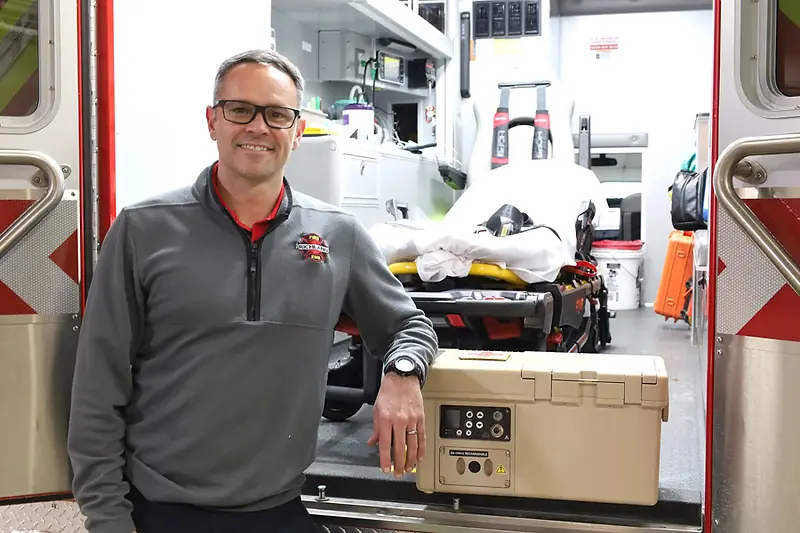
When we designed the Delta ICE 2L Smart Blood Cooler and the APRU 6L Autonomous Portable Refrigeration Unit, the goal was for blood to stay in range in prehospital environments, from military to EMS, far from any technician. That goal shaped an architecture where temperature control lives on the device, and connectivity is used to see what is happening rather than to steer it.
Temperature control stays with the device. The APRU 6L maintains blood temperature between 2°C and 6°C using its own onboard heating and cooling. The Delta ICE 2L keeps blood at 2 to 6°C using a conditioned, temperature-controlled insert; its battery powers sensors and communications, not cooling. Neither relies on a remote service to keep blood cold, and BloodCOMM® is not a control panel for their temperature settings.
Connections are short-range or purpose-built. The APRU 6L connects over Bluetooth to a nearby BloodCOMM® Connect, which relays its data over cellular to BloodCOMM®. The Delta ICE 2L is both Bluetooth and cellular capable, so it can report directly. In both cases the connection is a one-way, read-only data stream: BloodCOMM® receives temperature, status and location, but cannot send commands back, so a device’s temperature setpoint cannot be accessed or changed remotely, as it was in the EFS incident. Neither device exposes a web login page on the public internet, the kind of exposure behind the supermarket attacks.
The record lives on the device too. Both units log temperature internally (every 15 minutes on the ICE 2L for 3 days; every 4 hours on the APRU 6L for 72 days). If a connection drops, the history is still there when it reconnects.
No connected system is immune to every threat, and we would never claim otherwise. But limiting what remote access can do is one of the most effective ways to limit what an attacker can do with it.
Detection is the safeguard that worked
At EFS, a person noticing rising temperatures overnight is what stood between an altered setpoint and potential losses. Good cold chain software should make that kind of catch routine rather than lucky.
That is the role BloodCOMM® plays across a blood program:
-
Alerts that reach people, wherever they are. BloodCOMM® can send SMS, email and push alerts for temperature excursions, device status and low battery, so a problem at 3 a.m. reaches the right supervisor rather than waiting for the morning shift.
-
A record of what each unit experienced. BloodCOMM® Premium tracks blood at the unit level. Each bag is scanned at registration, and every check-in, transfer, inspection, transfusion and temperature reading builds its own chain of custody.
-
Device behavior you can review. Premium adds reporting on lid-open events, charging status and device health, plus GPS location for each enrolled device. Unusual patterns are visible, not buried.
-
Reports to the people who need them. Automated reports go to blood banks, hospitals and supervisors, so the organizations who supply and oversee blood see the same evidence the program does.
Questions worth asking about any connected storage equipment
Whether you use our products or someone else's, these questions are a good starting point for a conversation with your vendors, contractors and IT team:
-
What can remote access change? Monitoring, settings, or both? If settings can be changed remotely, who holds those credentials?
-
Is any management interface reachable from the public internet? If so, how is it protected, and have default passwords been changed, including on contractor accounts?
-
Does the equipment keep working, and keep recording, if the network goes down or is deliberately cut?
-
Who gets alerted, how, and at what hour? Is there a named person who will see an excursion overnight?
-
Can you show what each unit of blood experienced? If a blood bank asks for a unit's full temperature history, how long would it take to produce?
-
How are firmware and software updates delivered, and is older equipment still supported?
None of these questions require a security background.
Protecting the whole chain
The EFS teams caught this one in time, and open reporting has helped the wider healthcare community learn from it. As more blood moves into prehospital care, from EMS to military medicine, the cold chain gets longer and more connected. Keeping it safe means keeping control close to the blood and visibility as wide as possible.
That principle shapes how we build the Delta ICE 2L, the APRU 6L and BloodCOMM®. If you are reviewing your program's equipment, or planning a program for the first time, our team is happy to talk through how our devices and software handle control, connectivity and records. Contact us at sales@deltadevteam.com. Our compliance and cybersecurity documentation is available on request through the DDT Trust Center.